Releases: farag2/Sophia-Script-for-Windows
23.10.2022




Donate
Enterprise LTSC 2019 | Enterprise LTSC 2021 | Windows 10 21H2/22H2 | Windows 11 21H2/22H2
Diff from v6.1.5
6.1.5...6.2.0
-
Moved from
PolFileEditor.dllto LGPO.exe from Microsoft;- It lets manually created policies keys in registry be visible in gpedit.msc snap-in by re-building policy cache by official way;
- So all functions that rely on policy will be visible in the snap-in for you;
- The
UpdateLGPEPolicieswas edited to be suitable for a new method based on LGPO.exe;- Commented out be default now.
-
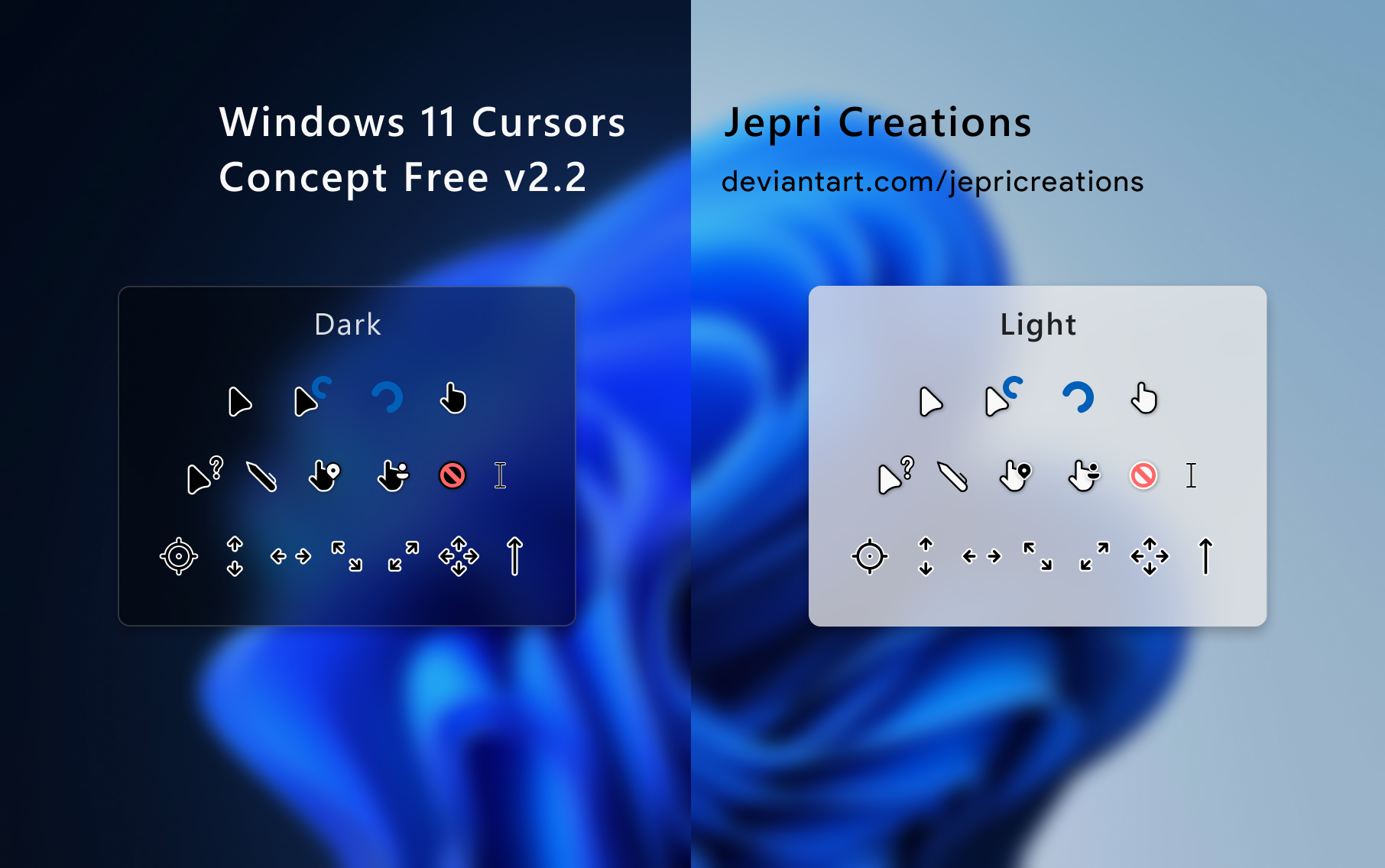
Added a new function
Cursors- Lets you to install free (light and dark) "Windows 11 Cursors Concept v2" cursors from Jepri Creations on-the-fly;
- Default option is
Dark.
-
The
InstallVCRedistfunction now installs both x86 and x64Visual C++ Redistributable 2015–2022packages; -
Fixed bug in the
Windows Cleanupscheduled task for cleaning Windows. If you applied this function in 6.1.5 release, re-apply in again using this release, unless the task won't run at all.- How-to call specific function
Sophia -Functions "CleanupTask -Register"
-
Minor changes.
09.10.2022
Donate
Enterprise LTSC 2019 | Enterprise LTSC 2021 | Windows 10 21H2/22H2 | Windows 11 21H2/22H2
Diff from v6.1.4
6.1.4...6.1.5
- Added a temp workaround to check whether
PolFileEditor.dllassembly was loaded due to even it was unblocked for SmartScreen before, it's blocked for loading into PowerShell session;- Fixes bug when script couldn't load
PolFileEditor.dllinto session and broke the functionality that relies on it. Now if script detects thatPolFileEditor.dllwasn't loaded, offer to restart powershell.exe session. - Will be obsolete with the 6.2.0 release.
- Fixes bug when script couldn't load
- Fixed
wingetnot installing Visual C++ Redistributable 2015–2022;- Microsoft changed package identifier.
- Minor changes.
Check out SophiApp 1.0.84! 🚀

13.08.2022
Donate
Windows 11 21H2/22H2 | Windows 10 2004/20H2/21H1/21H2/22H2 | Enterprise LTSC 2021 | Enterprise LTSC 2019
Diff from v6.1.3
6.1.3...6.1.4
-
We opened our official Discord channel! Feel free to chat and talk!
-
Improved Defender checkings;
- Now they're skipped for
Windows 10 Enteprise G; - Closes #379.
- Now they're skipped for
-
Now all all
.ps1, .psm1, .psd1files are signed in cloud via GitHub Actions by a self-issued certificates; -
Removed unnecessary
BitLockerContextfunction; -
Improved
UpdateLGPEPoliciesfunction;- Now it covers more GPOs to find in AMDX templates;
- Thanks
Alex_Piggyfor the code snippet.
-
Fixed bug when user couldn't launch PowerShell 7 based script if there is no localization for user's system;
- Closes #377.
-
OpenWindowsTerminalAdminContextfunction was re-written;OpenWindowsTerminalAdminContext -Enable,OpenWindowsTerminalAdminContext -Disable;- Now it uses officially documented feature to make Windows Terminal to launch as administrator by default by editing
%LOCALAPPDATA%\Packages\Microsoft.WindowsTerminal_8wekyb3d8bbwe\LocalState\settings.jsonfile.
To remove old context menu item, run
$Items = @(
  "Registry::HKEY_CLASSES_ROOT\Directory\Background\shell\runas",
  "Registry::HKEY_CLASSES_ROOT\Directory\shell\runas"
)
Remove-Item -Path $Items -Recurse -Force -ErrorAction Ignore
And make Windows Terminal context menu item visible if you hid it before.
Remove-ItemProperty -Path "HKLM:\SOFTWARE\Microsoft\Windows\CurrentVersion\Shell Extensions\Blocked" -Name "{9F156763-7844-4DC4-B2B1-901F640F5155}" -Force -ErrorAction Ignore
-
Improved the Ukrainian 🇺🇦: translation.
-
Minor changes.
Check out SophiApp 1.0.77! 🚀

Contributors

Assets 10
27.07.2022
Windows 11 21H2/22H2 | Windows 10 2004/20H2/21H1/21H2/22H2 | Enterprise LTSC 2021 | Enterprise LTSC 2019
Diff from v6.1.2
6.1.2...6.1.3
- Strengthen the Defender checking whether it was destroyed by 3rd party apps;
- Improved and fixed bug when
DNSoverHTTPSfunction didn't enable DNS-over-HTTPS feature;- Please check if it's enabled for you in the Settings;
- #374 closed.
- Improved the Ukranian 🇺🇦 : translation.
- #375 merged.
- Minor changes.
Sophia Script Wrapper 2.5.7
- Output PowerShell: Refresh Console before Export
- Output
DNSoverHTTPSfor other languages other than English
16.07.2022
Windows 11 21H2/22H2 | Windows 10 2004/20H2/21H1/21H2/22H2 | Enterprise LTSC 2021 | Enterprise LTSC 2019
Diff from v6.1.1
6.1.1...6.1.2
Anniversary build of Sophia Script!💯⭐
- Improved startup checkings, especially regarding Microsoft Defender whether it wasn't removed or destroyed by malicious tweakers;
- Added
RKNBypassfunction to enable proxying only blocked sites from the unified registry of Roskomnadzor;- The function will be applied only if the region in Windows is set to "Russia";
- Based on https://antizapret.prostovpn.org proxy.
- Added
WSAfunction to enable the latest Windows Subsystem for Android™ with Amazon Appstore;- All necessary dependencies will enabled (reboot may require) and the Microsoft Store WSA page will be opened to install it manually;
- To use Windows Subsystem for Android™ on your device, your PC needs to have Solid State Drive (SSD) installed.
- #365 closed
- Minor changes;
- Fixed numerous typos.
Sophia Script Wrapper 2.5.6
- @BenchTweakGaming fixed minor UI bug;
- Resized width of window for Russian and fixes scrolling per tab.
Contributors

Assets 10
05.07.2022
Windows 11 21H2/22H2 | Windows 10 2004/20H2/21H1/21H2/22H2 | Enterprise LTSC 2021 | Enterprise LTSC 2019
Now you can download the always latest Sophia Script archive by invoking (not as administrator too) in PowerShell console
irm script.sophi.app | iexThe command will download and expand the latest Sophia Script archive (without running) according which Windows and PowerShell versions it is run on. If you run it on Windows 11 via PowerShell 5.1, it will download Sophia Script for Windows 11 PowerShell 5.1.
Diff from v6.1.0
6.1.0...6.1.1
- Now the repo doesn't keep any 3rd party libraries, and all scripts are built using an updated GitHub Action config;
- 3rd party tools that are downloaded and used;
- Fixed bug in
NetworkAdaptersSavePowerfunction when script hung if one network adapter was disabled;- Reported by @poohart.
- Fixed bug in
UninstallUWPAppsfunction for PowerShell 7 based scripts when a WPF form didn't render at all;- Reported by @poohart.
- Improved
UpdateLGPEPoliciesfunction;- Now it creates
GPT.inifile automatically if it doesn't exist.
- Now it creates
- Minor changes;
- Fixed numerous typos.
Sophia Script Wrapper 2.5.5
- @BenchTweakGaming fixed bug when the app crashed if a PowerShell 7 preset was imported;
- Minor changes;
Check out SophiApp 1.0.0.71! 🚀


| File | SHA256 |
|---|---|
| Sophia.Script.for.Windows.10.LTSC.2019.v5.3.1.zip | 1C8B3B5CA76BF20651D53C5F882973D8CA1CDBDE9114BCF1C8C11FC3EC80F17D |
| Sophia.Script.for.Windows.10.LTSC.2021.v5.13.1.zip | 87CB29F92B751820F6E8E901135DAA6BC3D2C19949EF05BDB02A7BED9272F8B5 |
| Sophia.Script.for.Windows.10.PowerShell.7.v5.13.1.zip | 23C57610C217F0DA4613DEE82F2C8BB4CC07614FBF9430EDD4D80942D7EEF5E8 |
| Sophia.Script.for.Windows.10.v5.13.1.zip | 102C549F02C7E5B4F0981894AD9FE1C98F9C0333901C00EC17170FF29BD7DF03 |
| Sophia.Script.for.Windows.11.PowerShell.7.v6.1.1.zip | D4A7F070021AC1D55382104A25984ADF68C51F34D4A2F928FC57ACF3C7EFC98C |
| Sophia.Script.for.Windows.11.v6.1.1.zip | 4CD9684972120694CD9E361E53AEB4B175CC9ED496B558BC5BEE6407EC86B354 |
| Sophia.Script.Wrapper.v2.5.5.zip | 15FE538DFEF0C288752A5941E0230C326C75FB27C967798F7EDDDF18BD23E012 |
Contributors

Assets 10
04.07.2022
Windows 11 21H2/22H2 | Windows 10 2004/20H2/21H1/21H2/22H2 | Enterprise LTSC 2021 | Enterprise LTSC 2019
Now you can download the always latest Sophia Script archive by invoking (not as administrator too) in PowerShell console
irm script.sophi.app | iexThe command will download and expand the latest Sophia Script archive (without running) according which Windows and PowerShell versions it is run on. If you run it on Windows 11 via PowerShell 5.1, it will download Sophia Script for Windows 11 PowerShell 5.1.
Diff from v6.0.14
6.0.14...6.1.0
- Added awesome
UpdateLGPEPoliciesfunction 👻- It's common known, that the
gpedit.mscsnap-in doesn't read settings from the Windows registry keys if they were made manually, bypassing the snap-in. This new function lets you update gpedit.msc to make all your policies created manually displayed regardless when registry keys were created. There is no need to run the wholeSophia Script— just callUpdateLGPEPoliciesfunction. By default this function will be invoked at very end of script running to make all policies registry keys used in the script displayed. - To check all policies applied to your OS (if they have a record in
gpedit.msc) after invokingUpdateLGPEPolicies, opengpedit.mscand navigate to:Computer Configuration—Administrative Templates—All Settings;User Configuration—Administrative Templates—All Settings.
- Uses PolicyFileEditor module created by Dave Wyatt
- Remind how to call a function from the module.
- It's common known, that the
- Added
InstallDotNetRuntime6function to let user install the latest .NET Desktop Runtime 6 (x86/x64);- The Internet access required;
- Closes #347.
- Fixed bug in
NetworkAdaptersSavePowerfunction that caused an error that there is no internet connection even if it was so; - Formaly added Windows 10 22H2 support;
- Updated startup checkings;
- Fixed
DiagnosticDataLevelfunction;- Now it uses
gpedit.mscpath:HKLM:\Software\Policies\Microsoft\Windows\DataCollectioninstead ofHKLM:\SOFTWARE\Microsoft\Windows\CurrentVersion\Policies\DataCollection; - To updated registry keys run
DiagnosticDataLevel -Minimal.
- Now it uses
- Added
SearchHighlightsfunction to hide search highlights for Windows 10; - Fixed
UnpinAllStartAppsfunction;- Now it's working for Windows 11 22H2 Insider Preview too.
- Removed
Windows10FileExplorerto enabledWindows 10 File Explorerin Windows 11; - Updated
TaskManagerWindowfunction to make it not to be run on Windows 11 22H2;- Closes #348.
- Fixed a bug in
OpenWindowsTerminalAdminContextfunction when you cannot open Windows Terminal as admin in a path ends in a backslash\; - Signed all PowerShell files by a self-signed certificates;
- #345 closed;
- Minor changes;
- Updated descriptions;
- Thanks to @TheBossMagnus

Sophia Script Wrapper 2.5.4
- Updated translations;
- Works with the latest Sophia Script preset files;
- Minor changes;
Check out SophiApp 1.0.0.62! 🚀
| File | SHA256 |
|---|---|
| Sophia.Script.for.Windows.10.LTSC.2019.v5.3.0.zip | 1C8B3B5CA76BF20651D53C5F882973D8CA1CDBDE9114BCF1C8C11FC3EC80F17D |
| Sophia.Script.for.Windows.10.LTSC.2021.v5.13.0.zip | 87CB29F92B751820F6E8E901135DAA6BC3D2C19949EF05BDB02A7BED9272F8B5 |
| Sophia.Script.for.Windows.10.v5.13.0.PowerShell.7.zip | 23C57610C217F0DA4613DEE82F2C8BB4CC07614FBF9430EDD4D80942D7EEF5E8 |
| Sophia.Script.for.Windows.10.v5.13.0.zip | 102C549F02C7E5B4F0981894AD9FE1C98F9C0333901C00EC17170FF29BD7DF03 |
| Sophia.Script.for.Windows.11.v6.1.0.PowerShell.7.zip | D4A7F070021AC1D55382104A25984ADF68C51F34D4A2F928FC57ACF3C7EFC98C |
| Sophia.Script.for.Windows.11.v6.1.0.zip | 4CD9684972120694CD9E361E53AEB4B175CC9ED496B558BC5BEE6407EC86B354 |
| Sophia.Script.Wrapper.v2.5.4.zip | 15FE538DFEF0C288752A5941E0230C326C75FB27C967798F7EDDDF18BD23E012 |
Contributors

Assets 10
09.04.2022
Windows 11 21H2 | Windows 10 2004/20H2/21H1/21H2 | Enterprise LTSC 2021 | Enterprise LTSC 2019
- Now you can download the always latest Sophia Script archive by invoking (
not as administrator too) in PowerShell console
irm script.sophi.app | iex- The command will download and expand the latest Sophia Script archive (
without running) according which Windows and PowerShell versions it is run on. If you run it on Windows 11 via PowerShell 5.1, it will download Sophia Script forWindows 11 PowerShell 5.1.
Diff from v6.0.13
6.0.13...6.0.14
-
Added checking that triggers Windows updating and Microsoft Store apps in the background if the build the app is laucnhed ins't supported;
# Enable receiving updates for other Microsoft products when you update Windows
(New-Object -ComObject Microsoft.Update.ServiceManager).AddService2("7971f918-a847-4430-9279-4a52d1efe18d", 7, "")

# Check for UWP apps updates
Get-CimInstance -Namespace "Root\cimv2\mdm\dmmap" -ClassName "MDM_EnterpriseModernAppManagement_AppManagement01" | Invoke-CimMethod -MethodName UpdateScanMethod

# Open the "Windows Update" page
Start-Process -FilePath "ms-settings:windowsupdate-action"

# Trigger Windows Update for detecting new updates
(New-Object -ComObject Microsoft.Update.AutoUpdate).DetectNow()
-
Added Windows 11 Insider Support. Requires 22509 build. Closes #336;
-
Added
StartLayoutfunction (for Windows 11 Insider 22509 build only-
Adds ability to configure Start Layout
StartLayout -Default
StartLayout -ShowMorePins
StartLayout -ShowMoreRecommendations
-
-
Added checking that checks whether OS is waiting to be rebooted;
-
Improved the
DefaultTerminalAppfunction; -
Fixed the
InstallVCRedistx64function;- Now it downloads the right package. Closes #335.
-
Removed the
DefenderSandboxfunction for Windows 11;- Windows 11 has already Sandbox for Defender enabled.
-
Minor changes;
-
Updated descriptions;
-
Check out SophiApp 1.0.0.50 🚀
| File | SHA256 |
|---|---|
| Sophia.Script.for.Windows.10.LTSC.2019.v5.2.20.zip | A793EB392320312131D86453D96AF63B81F5F43B0281A58B2FEBB49E30381F0F |
| Sophia.Script.for.Windows.10.LTSC.2021.v5.12.12.zip | 98534D20748421CA89D78C83EB8B7E1690F0C7A00F4D8A14F2558AC8ACD07B29 |
| Sophia.Script.for.Windows.10.v5.12.14.PowerShell.7.zip | 225478A8DE45F161E872808D002F790A755CC9BE5FBD748CC82DDE56F3E83132 |
| Sophia.Script.for.Windows.10.v5.12.14.zip | 7CC830564F998F6E05B2109076CCC49F7303F59F4955CE61BF882BD6D1ACE52E |
| Sophia.Script.for.Windows.11.v6.0.14.PowerShell.7.zip | 55E593E36BCEDC0130142A3A0F6DB9CAB13DA3FE3C8C911B111FA81513E3ED2C |
| Sophia.Script.for.Windows.11.v6.0.14.zip | C6D316279E895E89CE80DEDB9AA60F7CD19B78E11E0F587F166FB96DB3907F17 |
| Sophia.Script.Wrapper.v2.5.3.zip | 2452941A49352510D41607D60B29AA3A56FE5C660F38EC2715752A52B58EF64E |
27.02.2022
Diff from v6.0.12
6.0.12...6.0.13
- Added the checking whether Defender wasn't disabled;
- Fixed
XboxGameBar;- To prevent popping up the "You'll need a new app to open this
ms-gamingoverlay" warning, you need to disable theXbox Game Barapp, even if you uninstalled it before.
- To prevent popping up the "You'll need a new app to open this
- Updated descriptions.
- Check out SophiApp 1.0.0.23 beta 3 🚀

| File | SHA256 |
|---|---|
| Sophia.Script.for.Windows.10.LTSC.2019.v5.2.19.zip | BC597CD782A11BF084DD8C64F3D39A75E75B5E896D363922CE38AC113BDC4CB1 |
| Sophia.Script.for.Windows.10.LTSC.2021.v5.12.11.zip | 0E970AE18F59497BA48A8AB0A1E8096C691AFF92FBA7A6FFDBB02A27216B50BA |
| Sophia.Script.for.Windows.10.v5.12.12.PowerShell.7.zip | 4A8F3720BDCBAC349BF4D599DE1761D132B07C471D6B9A147E04E10B45CB4526 |
| Sophia.Script.for.Windows.10.v5.12.12.zip | 9D5B1CF32EAFF31D1B3D3594EB9F21EEFFEB10F0A1D3F38A649222DA192412B4 |
| Sophia.Script.for.Windows.11.v6.0.13.PowerShell.7.zip | 716E2F4D3FD6237F4324F83F75719F502387FCD92E523023DC396FDFD9AF5E5F |
| Sophia.Script.for.Windows.11.v6.0.13.zip | E38117759EFF9DF20633F0F23CCB4D7E5B6CF2EAE0212127483674CB434B7822 |
| Sophia.Script.Wrapper.v2.5.3.zip | C6FB052904BB5FB7EBAD244EB05CCBEFE99F6B72E2959F1B6A1BF2EA89D1A37B |
02.02.2022
Diff from v6.0.11
6.0.11...6.0.12
| File | SHA256 |
|---|---|
| Sophia.Script.for.Windows.10.LTSC.2019.v5.2.19.zip | D0A1CD62ACBC454A0600872F508BAA2D5565FAF773FCB06C920A507D6402A9C9 |
| Sophia.Script.for.Windows.10.LTSC.2021.v5.12.10.zip | 7A2C2BEF0DE3FB63F586591EAF481480553B39AC5341353F6F06E8AF3FDCCF4F |
| Sophia.Script.for.Windows.10.v5.12.11.PowerShell.7.zip | 4A8F3720BDCBAC349BF4D599DE1761D132B07C471D6B9A147E04E10B45CB4526 |
| Sophia.Script.for.Windows.10.v5.12.11.zip | 0924DDF20AC4A2D84E9D5E789CB3937D8F4FA4C6979D149A2EF393851A43EBBD |
| Sophia.Script.for.Windows.11.v6.0.12.PowerShell.7.zip | 9C5DC69C4F411999CCA11387909985C9F3D74965FCA83312E903209E511D8B3C |
| Sophia.Script.for.Windows.11.v6.0.12.zip | CD43421812524EE99BAB2F6574EC2310C1BC97BD4F842CE3635EA481A7E7E702 |
| Sophia.Script.Wrapper.v2.5.3.zip | 873FA24399D2AB42C1C4B9900E1AF69C24C3D343C01A8C6EE82B00B606209B3C |